
Reviews by Daniel McKay
Professional color grading monitors are the only defense against costly client disputes in 2026.
Consequently, relying on a standard computer screen or a gaming display for final delivery is a significant business risk. Notably, modern delivery standards require displays that can sustain high brightness and wide color gamuts without shifting. Furthermore, the rise of HDR content on streaming platforms means 10-bit panels are now mandatory for serious work. This guide identifies the most reliable reference screens available today to secure your post-production workflow.
Key Takeaways
- True 10-Bit Panels: 8-bit monitors cause ugly banding in gradients. Therefore, professional work requires true 10-bit hardware for smooth color transitions.
- Hardware Calibration: Software profiling is insufficient for broadcast standards. Consequently, you must use monitors that save calibration LUTs directly to the display’s internal processor.
- DCI-P3 Coverage: The web and cinema now use wider color spaces than traditional sRGB. Resultantly, your monitor must cover at least 98% of the DCI-P3 gamut for accuracy.
Why You Need Professional Color Grading Monitors
Investing in high-end display glass is largely about securing client trust. Specifically, if your final delivery looks different on the client’s device than it did in your edit suite, you lose credibility instantly. Therefore, professional color grading monitors serve as the unshakeable “source of truth” for your entire image pipeline. Unlike consumer televisions, these reference displays maintain consistent luminance and color temperature over long periods of use.
Consequently, you can grade with total confidence. Furthermore, these high-resolution displays allow you to spot subtle artifacts. Notably, macro-blocking or noise often stay invisible on cheaper screens. Resultantly, the initial investment in a pro monitor pays for itself quickly. It reduces endless revision rounds. Ultimately, it is the tool that guarantees your creative intent makes it to the final screen.
Key Features of Modern Reference Grade Displays
Selecting the right monitor involves understanding specific technical metrics. Notably, marketing terms like “HDR ready” are often misleading on consumer products. Therefore, professionals need to look deeper into the panel technology. Consequently, you must ensure your chosen display meets specific criteria for bit depth and brightness. This ensures your work meets the high standards of 2026 mastering.
The 10-Bit Color Revolution
Most budget monitors claim to be “10-bit” but actually use 8-bit panels with dithering. Specifically, they use Frame Rate Control (FRC) to mimic depth. However, true professional color grading monitors feature native 10-bit hardware. Consequently, they can display over one billion distinct colors. Therefore, they eliminate ugly “stair-stepping” artifacts in blue skies or smooth skin tones.
Notably, for broadcast, cinema, or high-end commercial delivery, native 10-bit hardware is non-negotiable. Furthermore, it ensures that your color gradients remain perfectly smooth during heavy grading. Consequently, you avoid the digital “breakdown” that occurs on inferior panels. Therefore, you should prioritize bit depth over resolution if your budget is tight. Resultantly, your final exports will look cleaner and more professional.
Brightness and HDR Mastering in 2026
HDR delivery is becoming the standard for major streaming platforms. Therefore, your monitor needs significant peak brightness to resolve highlights correctly. Specifically, look for VESA DisplayHDR 1000 certification at a minimum. Furthermore, local dimming technology is essential to achieve deep blacks alongside bright highlights. Consequently, mini-LED technology has become the preferred choice for editors.
Notably, mini-LED offers near-OLED performance without the burn-in risks. Furthermore, it provides the necessary “pop” for high-dynamic-range content. Consequently, you can grade highlights accurately without losing detail in the shadows. Resultantly, your HDR masters will look stunning on consumer OLED TVs. Therefore, high peak brightness is a foundational requirement for any modern reference display.
Top Hardware Options for the Professional Market
The market for high-end displays is currently very competitive. Notably, three brands have consistently delivered the quality demanded by post-production houses. Furthermore, these manufacturers offer professional-grade support and long-term reliability. Consequently, they are the primary choices for a professional studio setup.
ASUS ProArt Innovations
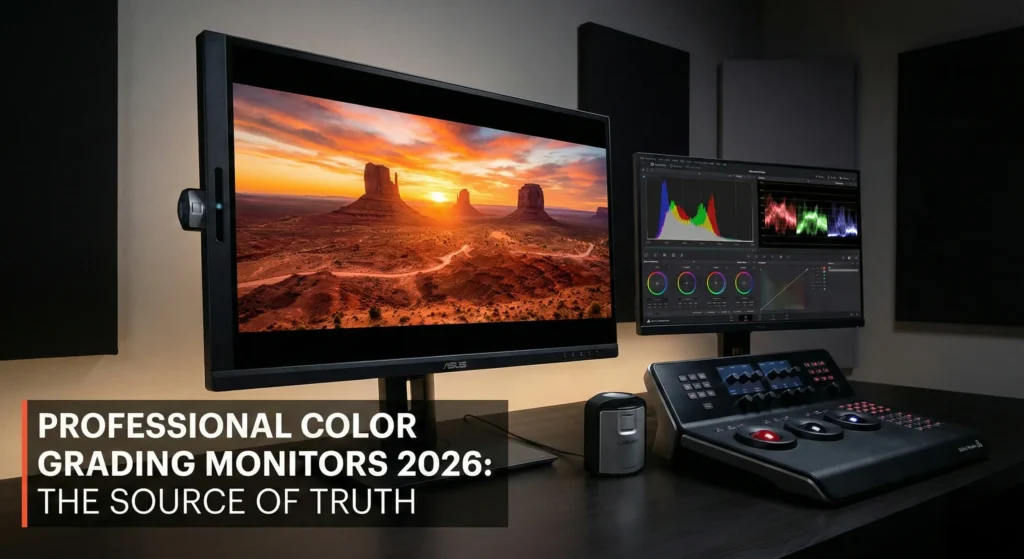
ASUS has aggressively targeted the post-production market with its ProArt line. Notably, top-tier models now feature built-in motorized colorimeters. Consequently, you can schedule automatic calibration to run during off-hours. Furthermore, their mini-LED options offer stunning contrast ratios. Specifically, these are tailored for HDR grading workflows.
Therefore, they are often considered the best value in the professional category. Notably, their Delta-E accuracy scores stay consistently below one. Furthermore, the build quality is robust enough for high-end studio environments. Consequently, ASUS ProArt has become a staple for independent colorists. Resultantly, you get a premium experience without the “prestige” price tag of broadcast-only brands.
BenQ Reference Standards
BenQ has built a long-standing reputation among photographers and video editors. Notably, their monitors include proprietary “Palette Master Ultimate” software. This allows for direct hardware calibration of the internal LUT. Furthermore, many models ship with a detachable shading hood. Consequently, they ensure that ambient light doesn’t skew your perception of color.
Specifically, the BenQ PV and SW series offer exceptional screen uniformity. Notably, you won’t see “vignetting” or color shifts at the edges of the display. Furthermore, their “Paper Color Sync” technology is excellent for hybrid creators. Consequently, they are the preferred choice for those who do both print and video work. Resultantly, BenQ offers a very reliable and scientific approach to color management.
Dell UltraSharp PremiereColor
Dell’s PremiereColor line is a staple in many corporate edit suites. Notably, they offer excellent modern connectivity options. Specifically, they include Thunderbolt 4 hubs for single-cable workflows. Furthermore, their built-in tools allow for quick switching between color spaces. Consequently, you can move from Rec.709 to DCI-P3 with a single button press.
Therefore, they are excellent “hybrid” monitors for generalist freelancers. Notably, the “IPS Black” technology in newer models offers double the contrast of traditional IPS panels. Furthermore, the Dell ecosystem is famous for its reliability and world-wide warranty. Consequently, it is a safe investment for businesses that cannot afford downtime. Resultantly, Dell remains a powerhouse in the professional display sector.
The Necessity of Hardware Calibration Probes
Even the most expensive professional color grading monitors drift over time. Notably, panel aging causes subtle shifts in color temperature and luminance. Therefore, regular calibration is essential to maintain accuracy. Specifically, you need a dedicated hardware probe for this process. Consequently, you ensure that your display remains a “reference” for years to come.
Furthermore, hardware calibration is superior to software-only methods. Specifically, it adjusts the monitor’s internal 14-bit or 16-bit Look-Up Table (LUT). Notably, this provides a much cleaner signal path. Furthermore, it prevents the “banding” that occurs when you adjust the graphics card’s signal. Consequently, you get a more accurate representation of your footage. Resultantly, a calibration probe is a mandatory accessory for any colorist.
Moreover, the latest probes from brands like Calibrite and Datacolor are incredibly fast. Specifically, they can complete a full calibration in under three minutes. Notably, they also measure ambient light to help you set the correct monitor brightness. Furthermore, they allow you to match multiple monitors in a dual-screen setup. Consequently, your workspace remains consistent and professional. Therefore, you should include a probe in your initial studio budget.
Technical Comparison of Professional Monitors
To help you decide, here is a comparison of typical specs for leading product lines.
| Feature | ASUS ProArt (Mini-LED) | BenQ SW-Series | Dell PremierColor (IPS Black) |
|---|---|---|---|
| Panel Type | Mini-LED | IPS | IPS Black |
| Bit Depth | True 10-Bit | 10-Bit / 8-Bit+FRC | True 10-Bit |
| Color Space | 99% DCI-P3 / Rec.2020 | 99% AdobeRGB / DCI-P3 | 98% DCI-P3 |
| Calibration | Built-in Motorized | External Probe Needed | External Probe Needed |
| HDR Peak Nits | 1000 – 1600 Nits | 400 – 600 Nits | 400 – 600 Nits |
| Best For | High-End HDR Grading | Photo & Video Hybrid | Corporate / Corporate |
Notably, the ASUS leads in pure HDR performance. Furthermore, BenQ remains the champion for uniformity and accessories. Consequently, your choice should reflect your primary delivery format. Therefore, consider the requirements of your typical client before investing.
Advanced Color Spaces: DCI-P3 vs. Rec.2020
Understanding color spaces is vital for the modern editor. Notably, Rec.709 was the standard for high-definition television for decades. However, professional color grading monitors must now handle much larger gamuts. Specifically, DCI-P3 is the standard for digital cinema and high-end mobile devices. Furthermore, Rec.2020 is the target for future 8K and 12K broadcast standards.
Consequently, your monitor needs to be able to “map” these colors correctly. Notably, if your monitor can only show sRGB, you are missing 25% of the colors available in DCI-P3. Furthermore, you might accidentally “clip” colors that your audience could actually see. Therefore, a wide-gamut display is essential for future-proofing your work. Resultantly, you can deliver masters that look vibrant on modern smartphones and cinema screens.
Moreover, the ability to switch gamuts quickly is a major workflow advantage. Specifically, you might need to deliver a Rec.709 version for web and a DCI-P3 version for a festival. Notably, professional monitors store these as “presets” in the hardware. Furthermore, they adjust the peak brightness and gamma curve automatically. Consequently, you save time and reduce the risk of technical errors. Therefore, look for displays with dedicated color-space buttons.
Final Verdict on Professional Color Grading Monitors
Ultimately, your monitor is the final checkpoint before your work reaches the world. Therefore, professional color grading monitors are not luxury items; they are absolute business necessities in 2026. If you need the absolute best HDR performance, the mini-LED ASUS ProArt models are currently unmatched. Furthermore, their built-in calibration features save massive amounts of time on set.
However, if you prioritize uniform screens and included accessories, the BenQ SW series is a fantastic workhorse. Specifically, they offer incredible value for hybrid shooters. Notably, Dell remains the king of connectivity and corporate reliability. Furthermore, the IPS Black technology offers a significant boost in contrast for non-HDR work. Consequently, invest in the display that matches your primary delivery targets.
Resultantly, your clients will notice the difference in consistency across their devices. Furthermore, you will work with more confidence and less frustration. Consequently, your production value will increase as you master the art of color. Therefore, choose your display wisely and calibrate often. Finally, keep your eyes fresh and your colors true. The quality of your final image depends entirely on what you can see.
Related pages
Affiliate disclosure: Some links on this page may be affiliate links. If you buy through them, we may earn a commission at no extra cost to you. We only recommend gear we’d use to build a reliable, professional workflow.